
Latest Version
Version
0.2.23
0.2.23
Update
September 01, 2026
September 01, 2026
Developer
Liora Labs
Liora Labs
Categories
Games
Games
Platforms
Android
Android
Downloads
0
0
License
Free
Free
Package Name
dev.gbadroid
dev.gbadroid
Report
Report a Problem
Report a Problem
More About GBA Emulator – Liora Pro
Play classic handheld games again — smooth, fast, and wherever you are.
Remember the feeling? Long RPG journeys, tight platformers, secret levels, cheat codes, save files, pixel worlds, and the simple joy of carrying your favourite games everywhere.
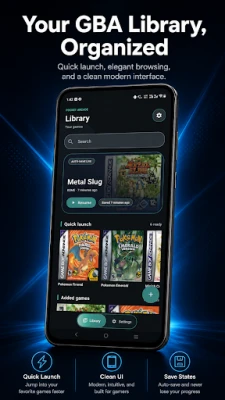
GBA Emulator – Liora Pro brings that retro gaming feeling to Android. It’s a modern, high-accuracy Game Boy Advance emulator built for smooth performance, custom controls, and all the features you want — without clutter.
Load your legally owned GBA backups, customise the experience, and enjoy timeless games on your phone or tablet. No ROMs, no BIOS, no piracy. Just your collection, done right.
FAST & ACCURATE EMULATION
Liora Pro is built for players who want their Game Boy Advance library running beautifully on modern devices.
• High-accuracy emulation using the open-source mGBA core
• Smooth, full-speed gameplay for a wide range of titles
• Clean audio, responsive controls, and crisp visuals
• Works seamlessly on phones and tablets
• Streamlined interface for quick sessions and long adventures
SAVE STATES & AUTO-RESUME
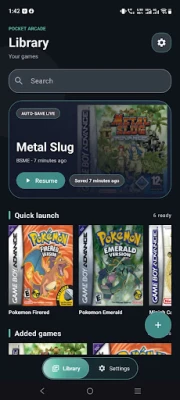
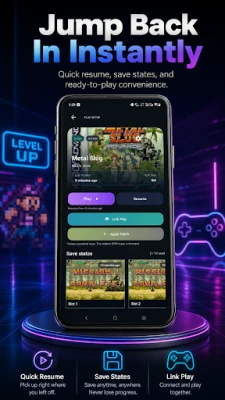
Pause instantly and jump right back where you left off.
• Quick save/load with state previews
• In-game save support
• Auto-resume when reopening the app
• Continue RPGs, boss fights, or casual pick-up sessions with zero friction
CHEAT CODES — YOUR WAY TO PLAY
Replay classics with the same cheats you remember, or try something new.
Supports GameShark, Action Replay, CodeBreaker, and VBA-style codes. Experiment, unlock hidden content, speed up replays, or breeze through mastered sections.
CUSTOM CONTROLS & GAMEPAD SUPPORT
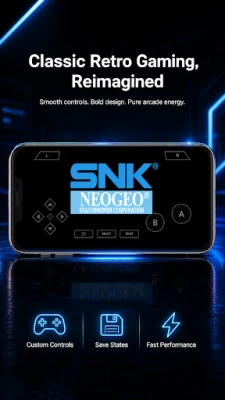
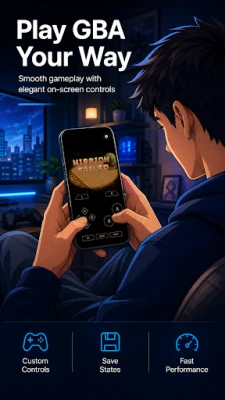
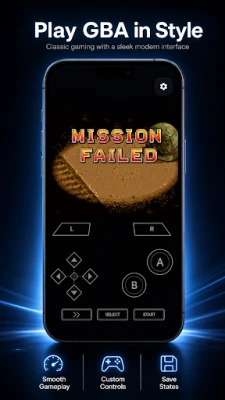
Play your way with fully customisable touch controls, or connect an external controller for an authentic handheld feel.
• Adjust button size, opacity, and position
• Layout profiles for phones and tablets
• Seamless gamepad support
• Comfortable, responsive design for long play sessions
FAST-FORWARD, SLOW MOTION & FRAME SKIP
Take full control of your game’s pace.
• Fast-forward through cutscenes, grinding, or slow dialogue
• Slow motion for tricky platforming and precise moves
• Frame skip options for performance tuning
• Useful for both casual players and retro enthusiasts
OPTIONAL CLOUD SAVE SYNC
Keep your progress safe across Android devices — on your terms.
• Optional Google Drive sync for saves
• ROMs and save data stay local by default
• You stay in full control; sync only when you choose
ROM PATCHING (IPS, UPS, BPS)
Enjoy translations, improvements, and ROM hacks using your own legally obtained game files. Apply patches directly — no need to permanently modify your original backups.
SHADERS, THEMES & DISPLAY
Make your retro games look exactly how you like.
• CRT and LCD screen shaders
• Multiple colour profiles
• App themes: Aurora, Noir, Neon, Retro, Graphite
• Comfortable and compact layout options
• Reduced motion setting for accessibility
BUILT WITH THE OPEN-SOURCE MGBA CORE
Powered by the mGBA core under MPL 2.0. Open-source notices and source info are available inside the app. Built on the work of the emulation community.
NO ROMS. NO BIOS. NO PIRACY.
Liora Pro does not contain games, ROMs, BIOS files, or copyrighted game content. You must supply your own legally obtained Game Boy Advance backups. This emulator is for legal personal use only with games you own or have the rights to use.
Game Boy Advance is a trademark of Nintendo. GBA Emulator – Liora Pro is an independent app, not affiliated with or endorsed by Nintendo or any console manufacturer.
Download GBA Emulator – Liora Pro and take your classic adventures everywhere.
GBA Emulator – Liora Pro brings that retro gaming feeling to Android. It’s a modern, high-accuracy Game Boy Advance emulator built for smooth performance, custom controls, and all the features you want — without clutter.
Load your legally owned GBA backups, customise the experience, and enjoy timeless games on your phone or tablet. No ROMs, no BIOS, no piracy. Just your collection, done right.
FAST & ACCURATE EMULATION
Liora Pro is built for players who want their Game Boy Advance library running beautifully on modern devices.
• High-accuracy emulation using the open-source mGBA core
• Smooth, full-speed gameplay for a wide range of titles
• Clean audio, responsive controls, and crisp visuals
• Works seamlessly on phones and tablets
• Streamlined interface for quick sessions and long adventures
SAVE STATES & AUTO-RESUME
Pause instantly and jump right back where you left off.
• Quick save/load with state previews
• In-game save support
• Auto-resume when reopening the app
• Continue RPGs, boss fights, or casual pick-up sessions with zero friction
CHEAT CODES — YOUR WAY TO PLAY
Replay classics with the same cheats you remember, or try something new.
Supports GameShark, Action Replay, CodeBreaker, and VBA-style codes. Experiment, unlock hidden content, speed up replays, or breeze through mastered sections.
CUSTOM CONTROLS & GAMEPAD SUPPORT
Play your way with fully customisable touch controls, or connect an external controller for an authentic handheld feel.
• Adjust button size, opacity, and position
• Layout profiles for phones and tablets
• Seamless gamepad support
• Comfortable, responsive design for long play sessions
FAST-FORWARD, SLOW MOTION & FRAME SKIP
Take full control of your game’s pace.
• Fast-forward through cutscenes, grinding, or slow dialogue
• Slow motion for tricky platforming and precise moves
• Frame skip options for performance tuning
• Useful for both casual players and retro enthusiasts
OPTIONAL CLOUD SAVE SYNC
Keep your progress safe across Android devices — on your terms.
• Optional Google Drive sync for saves
• ROMs and save data stay local by default
• You stay in full control; sync only when you choose
ROM PATCHING (IPS, UPS, BPS)
Enjoy translations, improvements, and ROM hacks using your own legally obtained game files. Apply patches directly — no need to permanently modify your original backups.
SHADERS, THEMES & DISPLAY
Make your retro games look exactly how you like.
• CRT and LCD screen shaders
• Multiple colour profiles
• App themes: Aurora, Noir, Neon, Retro, Graphite
• Comfortable and compact layout options
• Reduced motion setting for accessibility
BUILT WITH THE OPEN-SOURCE MGBA CORE
Powered by the mGBA core under MPL 2.0. Open-source notices and source info are available inside the app. Built on the work of the emulation community.
NO ROMS. NO BIOS. NO PIRACY.
Liora Pro does not contain games, ROMs, BIOS files, or copyrighted game content. You must supply your own legally obtained Game Boy Advance backups. This emulator is for legal personal use only with games you own or have the rights to use.
Game Boy Advance is a trademark of Nintendo. GBA Emulator – Liora Pro is an independent app, not affiliated with or endorsed by Nintendo or any console manufacturer.
Download GBA Emulator – Liora Pro and take your classic adventures everywhere.
Rate the App
Add Comment & Review
User Reviews
Based on 0 reviews
No reviews added yet.
Comments will not be approved to be posted if they are SPAM, abusive, off-topic, use profanity, contain a personal attack, or promote hate of any kind.











More »

Popular Apps

KeyNavigatorKeyBank, N.A.

Union ease - Mobile BankingUnion Bank of India

Knight Eternal: Pixel RPGJoshua Keith

Quest Town SagaKairosoft
KAIJU NO. 8 THE GAMEAkatsuki Games Inc.

Grow Swordmasterpixelstar

Bank of America Private BankBank of America
Nitro Nation: Car Racing GameSupercharge Mobile

MoboReels: Good Reel Short TVMOBOREADER TECHNOLOGY USA CO LTD

Wells Fargo Vantage℠Wells Fargo Mobile
More »
Editor's Choice

Grim Soul: Dark Survival RPGBrickworks Games Ltd

Craft of Survival - Gladiators101XP LIMITED

Last Shelter: SurvivalLong Tech Network Limited
Dawn of Zombies: Survival GameRoyal Ark

Merge Survival : WastelandStickyHands Inc.

AoD Vikings: Valhalla GameRoboBot Studio

Viking Clan: RagnarokKano Games

Vikings: War of ClansPlarium LLC

Asphalt 9: LegendsGameloft SE

Modern Tanks: War Tank GamesXDEVS LTD